Take Your Construction Projects Off WhatsApp.
Put Them Under Control.
CraneView replaces scattered chats, spreadsheets, and paper with structured, auditable workflows — so every task, instruction, and approval is tracked from site setup to final sign-off.
Your Projects Still Run on WhatsApp and Paper
Instructions get buried in group chats. Site photos live on personal phones. Approvals happen by voice note. And when a dispute lands on your desk, there's no record to back you up.
Managing multiple sites this way doesn't just cause stress — it costs you money, time, and credibility with clients.
CraneView Puts Every Project in One Place
One platform for execution and control — designed around how construction actually runs, not how software wishes it did.
One Source of Truth
Every project, task, instruction, photo, and update lives in one platform — not across six apps and a stack of paper.
Complete Audit Trail
Every action is timestamped and tracked: who did what, when, and why — with comments and attachments preserved.
Clear Accountability
Structured review-and-resubmit loops mean every RFI, snag, and instruction has an owner — and the originator closes it.
Visibility Across Sites
Dashboards surface open RFIs, unresolved snags, and overdue updates across every project — before they become problems.
Built for Every Role on the Project
Formal communication flows through the contractor manager — Client ↔ Manager ↔ Supervisor — so escalation is controlled and nothing bypasses governance.
Contractor Manager
The control and communication hub of every project.
- Set up projects, teams, and workflows
- Review and approve site submissions
- Manage RFIs, snags, instructions & variations
- Control costs and client communication
Site Supervisor
Everything needed to run the day — from a phone.
- Capture attendance and daily updates
- Add photos and progress notes on the go
- Execute assigned tasks
- Respond to snags and site instructions
Client
Oversight and approvals — on their terms.
- Raise RFIs, snags, and instructions
- Issue and approve variations
- Work inside the platform, or externally
- Full audit trail either way
Each role sees exactly what they need — nothing more, nothing less.
From Site Setup to Sign-Off
A structured, step-by-step flow that keeps execution moving and governance intact.
Set Up Your Project
Create the project, assign roles and teams, and allocate assets — everything starts structured.
Execute on Site
Supervisors capture attendance, tasks, photos, and daily updates from their phones, throughout the day.
Raise & Resolve
RFIs, snags, site instructions, and variations move through clear workflows: acknowledge, execute, submit.
Review & Approve
Managers review submissions, query what's incomplete, and approve what's right — in a documented loop.
Close With Confidence
The originator closes every item, leaving a complete, timestamped audit trail behind it.
See It in Action
Real screens from the platform — the same views your managers and site teams work from every day.
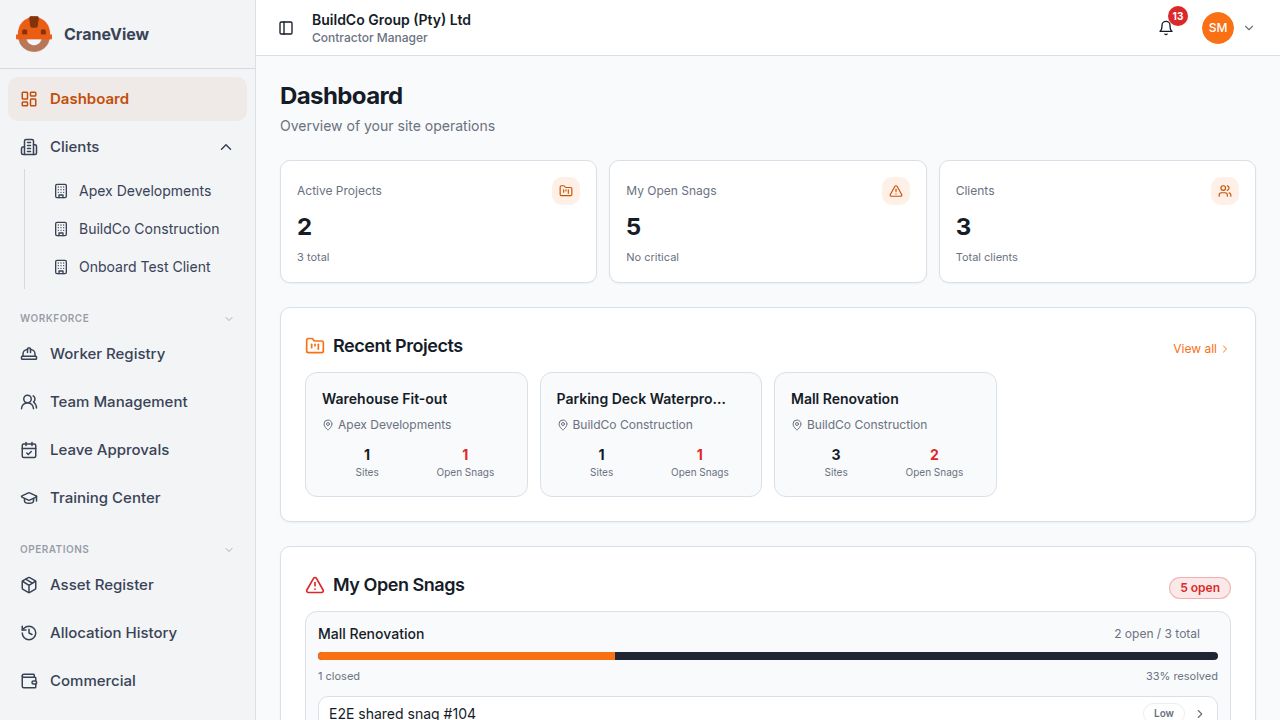
Manager Dashboard
Every project, open snag, and client at a glance the moment you log in.
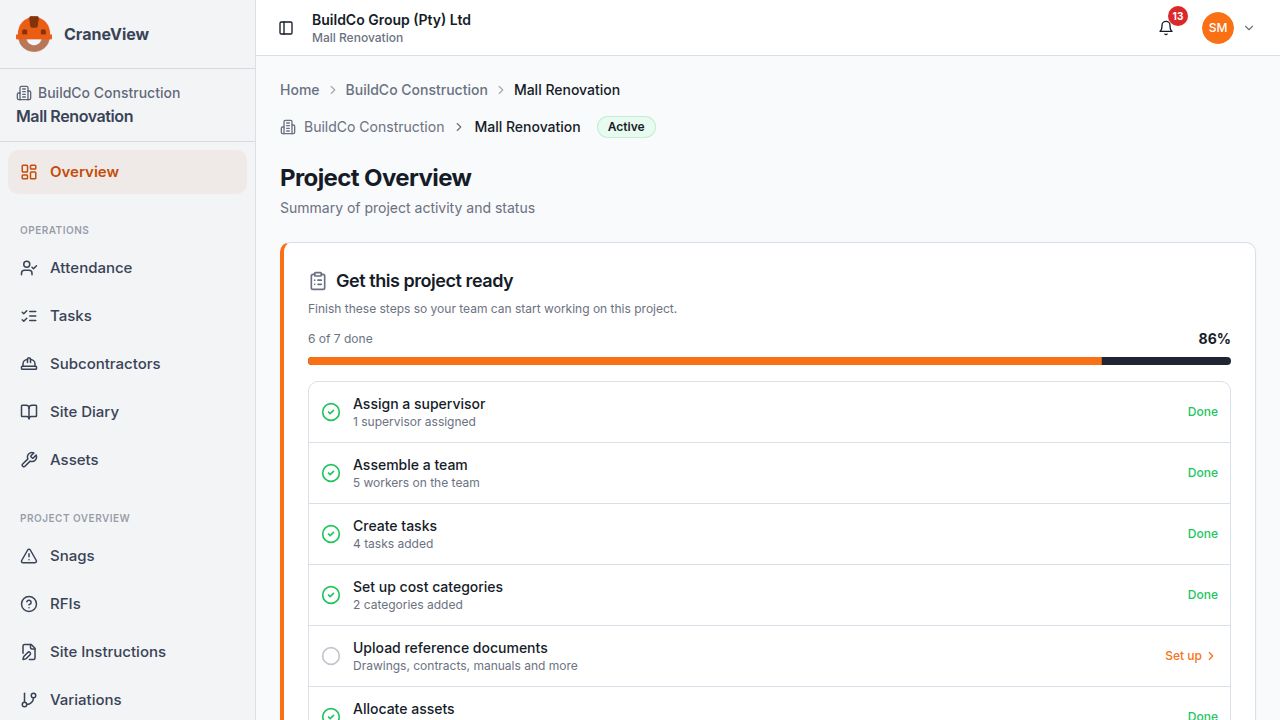
Project Setup Checklist
A guided checklist gets every project site-ready — supervisors, crew, tasks, costs, and assets.
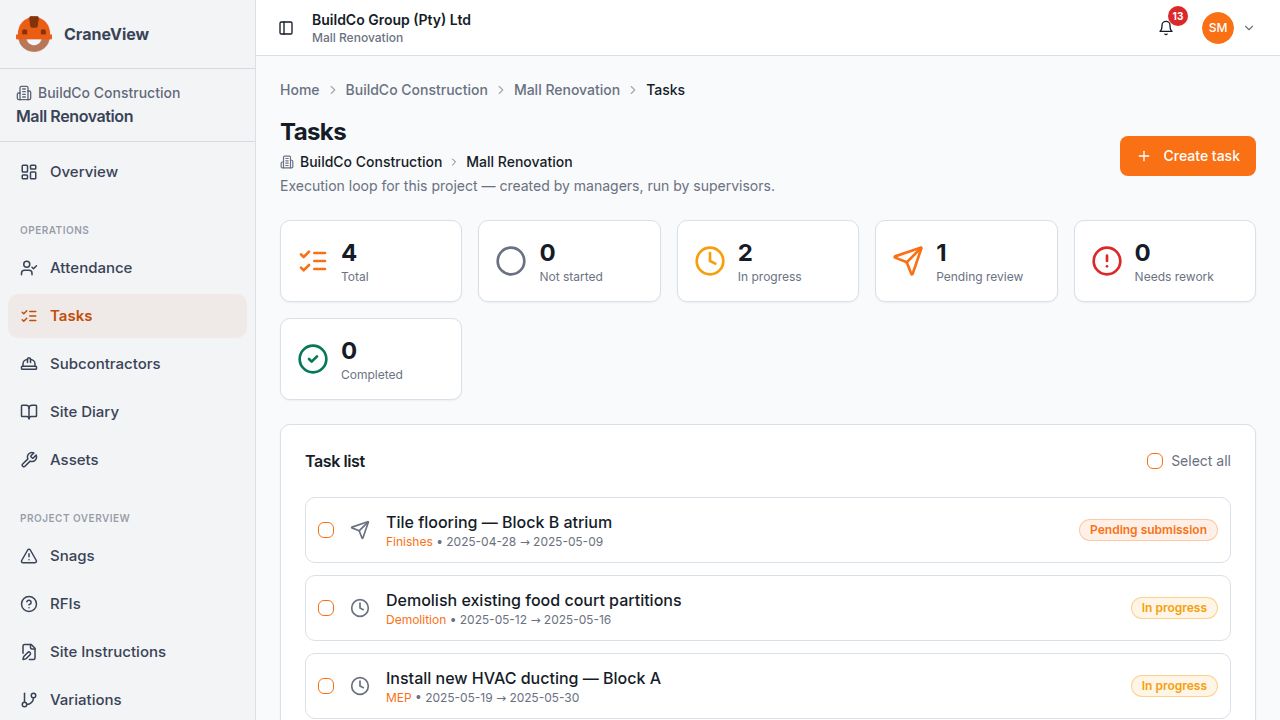
Task Tracking
Tasks move through a clear execution and review loop, with status visible to the whole team.
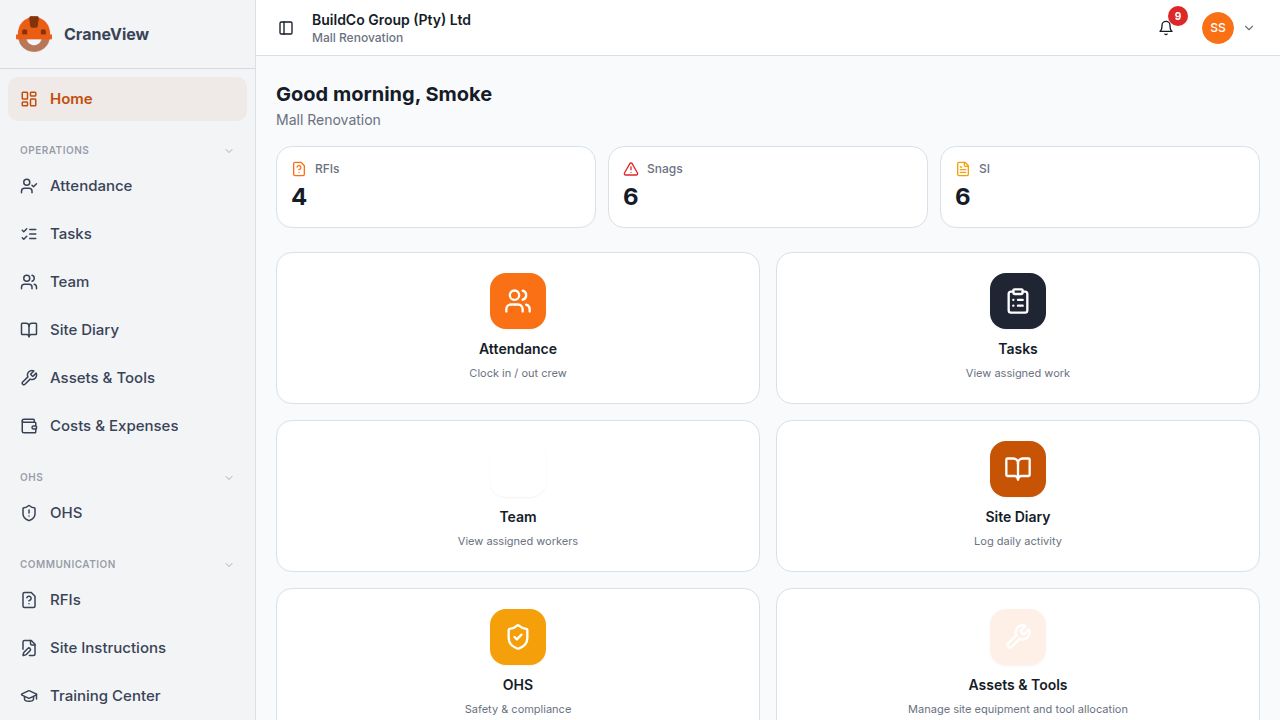
Supervisor Workspace
Site teams clock crews in, log the site diary, and raise issues from one simple hub.
Ten Modules. One Platform.
Everything a running site needs — nothing it doesn't.
What You Get Out of It
Total Control. Zero Guesswork.
Run every project from one place, with a formal record behind every decision.
- See the status of every site at a glance
- Every instruction, approval, and variation formally recorded
- Track income, actual, and anticipated costs — including variation impact
- Protect your business in disputes with a complete audit trail
Everything You Need. In Your Pocket.
A mobile-first tool built for the way site work actually happens.
- Capture updates, photos, and attendance from your phone
- One clear list of your tasks and open items
- Respond to snags and instructions in a few taps
- Stop chasing decisions through chat threads
Frequently Asked Questions
CraneView is built for small to mid-sized contractors and construction firms managing multiple projects, supervisors, teams, and subcontractors — especially those currently running on WhatsApp, Excel, and paper.
No. CraneView supports both in-platform and off-platform clients. If a client prefers email or calls, your contractor manager logs the interaction with supporting documents — the audit trail stays complete either way.
Yes. CraneView is mobile-first for supervisors and field users — attendance, daily updates, photos, task execution, and responses to instructions all happen from a phone.
Structured workflows. Daily updates, RFIs, snags, site instructions, and variations each follow a defined loop — raise, acknowledge, execute, submit, review, close — with comments, photos, and attachments captured against each item instead of scattered in chats.
CraneView tracks project financials at category level: income, actual cost, anticipated cost, and the impact of variations. It's operational cost control, not a detailed BOQ tool.
CraneView is currently in beta. Join the waitlist and you could be selected as a beta tester — beta testers get 3 months of free access and a direct say in how the product develops. Everyone else on the list gets first notice the day we launch.
Be First on Site.
CraneView is in beta. Join the waitlist and you could be selected as a beta tester — with 3 months of free access. Everyone else on the list gets first notice the day we launch.